How to Use Claude Code the Right Way (+ 5 MCP Connectors)
A practical Claude Code guide: CLAUDE.md, plan mode, verification and context habits, plus how to install Playwright, Grafana, GitHub, Context7 and Sentry MCP connectors.
By Amal V S, Backend & AI Systems Architect · Mon Oct 12 2026
Most people use Claude Code like a smarter autocomplete: type a request, accept the diff, repeat. That works — until the session gets long, the context fills up, and the output quietly gets worse. Using Claude Code well is less about clever prompts and more about a workflow: give it the right context, make it plan before it edits, give it a way to check its own work, and connect it to the tools you already use.
This guide covers exactly that: the habits that make Claude Code reliable, the difference between plugins and MCP connectors, and five connectors worth installing today — Playwright, Grafana, GitHub, Context7 and Sentry — each with the install command and a prompt you can copy.
Key takeaways
Run
/initto create aCLAUDE.md, then keep it short — every line costs context in every session.Separate thinking from doing: explore and plan in plan mode (
Shift+Tab), then implement.Always give Claude a check it can run — tests, a build, or a screenshot. Verification is what lets you walk away.
Context is the scarce resource:
/clearbetween tasks,/compactwith a focus, subagents for research.Connect external tools with
claude mcp add; install bundles of skills, agents, hooks and servers with/plugin.
Why most Claude Code sessions go sideways
Claude Code is an agentic coding tool: it reads files, runs commands, edits code and iterates on its own. Everything it reads — your messages, every file, every command output — lands in one context window, and Anthropic's own best-practices guide is blunt about the consequence: performance degrades as that window fills. Almost every tip below is a way of spending context more carefully.
Give Claude a way to verify its work. It's the difference between a session you watch and one you walk away from.
The workflow: 6 habits for using Claude Code the right way
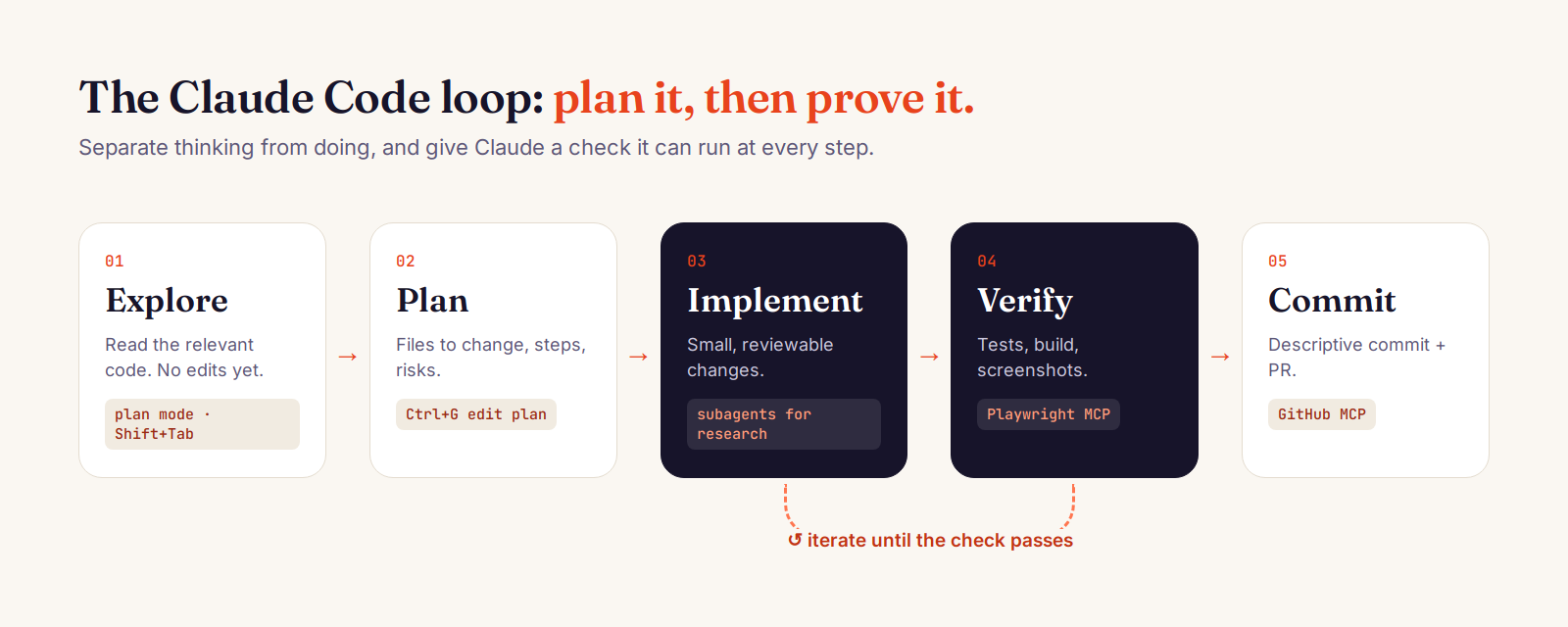
1. Start every project with /init and a lean CLAUDE.md
Run /init in your repository. Claude scans the project and writes a starter CLAUDE.md — a file it reads at the start of every session. Then edit it down. Keep only what Claude can't infer from the code: build and test commands, style rules that differ from defaults, repo etiquette, and gotchas.
# CLAUDE.md
# Commands
- npm run dev        # Vite dev server on :5173
- npm test -- <file> # run a single test file, not the whole suite

# Conventions
- ES modules only; no default exports in /lib
- API errors return { error: string } with a proper status code

# Gotchas
- .env is tracked in git: put secrets in .env.local instead
A good test for each line: would removing it cause Claude to make mistakes? If not, cut it. A bloated CLAUDE.md doesn't make Claude smarter — it buries the rules that matter. Knowledge you only need sometimes belongs in a skill (.claude/skills/<name>/SKILL.md), which loads on demand.
2. Explore, then plan, then code
Press Shift+Tab until the status bar shows plan mode (or start with claude --permission-mode plan). In plan mode Claude reads and reasons but doesn't edit. Ask it to understand the relevant code, then to write a plan. Press Ctrl+G to edit the plan in your own editor before approving it.
read src/auth and explain how sessions and token refresh work.
then: I want to add Google OAuth. which files change? write a step-by-step plan.
Skip planning for one-line fixes. Use it when the change spans several files or you don't know the code yet.
3. Always give it a way to verify
Claude stops when the work looks done. Give it something that returns pass/fail and it will iterate until it actually is: a test suite, a build, a linter, or a screenshot to compare against. Ask for evidence, not assurances.
write validateEmail(). cases: user@example.com -> true, "invalid" -> false,
user@.com -> false. run the tests after implementing and paste the output.
4. Treat context as a budget
/clearbetween unrelated tasks. A clean session with a better prompt beats a long one full of corrections./compact Focus on the API changessummarises the session while keeping what you name./btwasks a side question whose answer never enters the conversation history.Escstops Claude mid-action;EscEscor/rewindrestores an earlier checkpoint of code and conversation./contextshows what's currently filling the window.
5. Delegate research to subagents
When a question needs Claude to read dozens of files, ask for a subagent. It explores in its own context window and returns a summary, so your main session stays focused on implementation. Subagents are also great reviewers: a fresh context isn't biased toward code it just wrote.
use subagents to investigate how token refresh works and whether we already
have OAuth helpers I should reuse. report file paths and a short summary.
6. Tune permissions instead of clicking 'allow' all day
Pre-approve the commands you trust with /permissions (for example npm run lint or git commit), and use /sandbox to let sandboxed commands run without prompts. Newer versions also offer auto mode, where a classifier reviews actions and blocks only the risky ones. For checks that must happen every single time — formatting after each edit, blocking writes to a migrations folder — use hooks (/hooks); unlike CLAUDE.md, hooks are deterministic.
Plugins vs MCP connectors: what's the difference?
MCP (Model Context Protocol) servers — often called connectors — give Claude new tools: a browser, your dashboards, your issue tracker, your error monitoring. You add one with a single command:
# remote server (recommended when available)
claude mcp add --transport http <name> <url>

# local server: everything after -- is the command to run
claude mcp add --transport stdio <name> -- <command> [args...]

claude mcp list      # see what's connected and healthy
/mcp                 # inside a session: status + OAuth login
Add --scope project to save a server in .mcp.json so your whole team gets it from version control, or --scope user to have it in every project on your machine.
A plugin is a package: a folder of skills, subagents, hooks and MCP servers that installs as one unit from a marketplace. Run /plugin to browse Anthropic's official marketplace and install with one click. Every enabled plugin adds a little to your context on every turn, so install the ones you use and disable the rest.
5 MCP connectors that make Claude Code dramatically more useful
Each one closes a loop Claude can't close on its own: seeing the UI, reading production signals, or knowing today's API.
1. Playwright MCP — let Claude see and test your UI
Playwright MCP gives Claude a real browser. It navigates, clicks, fills forms and reads pages through Playwright's accessibility tree rather than pixels, which is fast and doesn't need a vision model. This is the missing verification step for frontend work: Claude can open the page it just changed and check it.
claude mcp add playwright npx @playwright/mcp@latestopen http://localhost:5173/login, sign in with the test user, and check that
the dashboard loads without console errors. take a screenshot when done.Tip: add --headless for CI-style runs or --isolated to keep the browser profile in memory. For high-volume scripted testing, Playwright's own CLI is more token-efficient; MCP shines for exploratory, stateful checks.
2. Grafana MCP — debug with real metrics and logs
The Grafana MCP server lets Claude search dashboards, run PromQL and LogQL queries, inspect alerts and incidents. Instead of pasting screenshots of graphs, ask Claude to pull the numbers itself and correlate them with the code.
claude mcp add --transport stdio \
  --env GRAFANA_URL=https://grafana.example.com \
  --env GRAFANA_SERVICE_ACCOUNT_TOKEN=<service-account-token> \
  grafana -- uvx mcp-grafana
p95 latency on the checkout service jumped this morning. query Prometheus for
the last 6 hours, check Loki for errors in the same window, and tell me which
deploy or endpoint it lines up with.Tip: create a dedicated Grafana service account with Viewer permissions for Claude. GRAFANA_SERVICE_ACCOUNT_TOKEN replaces the older, deprecated GRAFANA_API_KEY.
3. GitHub MCP — issues, PRs and reviews without leaving the terminal
With GitHub connected, Claude can read an issue, find the related code, open a pull request and respond to review comments. It turns "fix issue #482" into a complete loop.
claude mcp add --transport http github https://api.githubcopilot.com/mcp/ \
  --header "Authorization: Bearer YOUR_GITHUB_PAT"
read issue #482, reproduce it with a failing test, fix it, and open a PR
that links the issue and summarises the root cause.Tip: use a fine-grained personal access token scoped to the repos you need. If you have the gh CLI installed, Claude can use that too — CLIs are often the most context-efficient way to talk to a service.
4. Context7 — up-to-date docs for every library
Models learn libraries at training time, so they sometimes suggest APIs that have changed or never existed. Context7 fetches current, version-specific documentation and examples into the prompt.
claude mcp add --transport http context7 https://mcp.context7.com/mcp \
  --header "Authorization: Bearer YOUR_CONTEXT7_API_KEY"
add a route loader that streams data with React Router 7. use context7Tip: name the exact library and version ("Next.js 15", or a Context7 ID like /supabase/supabase) to skip library matching and get precise results.
5. Sentry — go from production error to fix
Sentry's remote MCP server lets Claude read issues, stack traces and affected releases. Combined with your codebase, that's the fastest path from an alert to a tested fix.
claude mcp add --transport http sentry https://mcp.sentry.dev/mcp
# then, inside Claude Code:
/mcp   # complete the OAuth login in your browser
look at the top unresolved Sentry issue in the api project. find the root
cause in our code, write a failing test that reproduces it, then fix it.Putting it together: one bug, five connectors
Here's what a single session looks like once these are connected:
Sentry surfaces a spike in TypeError: cannot read 'total' of undefined on checkout.
Grafana shows the error rate rose right after the latest deploy, only for one payment provider.
Context7 confirms the provider's SDK changed its response shape in the new major version.
Claude writes a failing test, fixes the mapping, and Playwright walks the checkout flow in a real browser.
GitHub gets a PR with the root cause, the test, and a link to the Sentry issue.
Every step produces evidence Claude can read — which is exactly what lets it finish the job without you watching every move.
Common mistakes to avoid
The kitchen-sink session: mixing unrelated tasks in one conversation. Fix:
/clearbetween them.Correcting in circles: after two failed corrections,
/clearand write a better first prompt.An over-stuffed CLAUDE.md: important rules get lost. Prune it; turn must-always rules into hooks.
Trusting without verifying: plausible code that misses edge cases. If you can't check it, don't ship it.
Installing every connector: each one adds tools to the context. Keep the ones you use; remove the rest.
FAQ
What is the best way to use Claude Code?
Give it a short CLAUDE.md, plan before editing anything non-trivial, always provide a way to verify the result (tests, build, screenshot), clear context between tasks, and connect the external tools your work depends on through MCP.
What is an MCP server in Claude Code?
An MCP server is a connector that gives Claude new tools — a browser, a database, Grafana, GitHub, Sentry. You add one with claude mcp add and manage them with claude mcp list or /mcp inside a session.
Are Claude Code plugins the same as MCP servers?
No. An MCP server is one connector. A plugin is a package that can contain skills, subagents, hooks and MCP servers together, installed from a marketplace with /plugin.
Which MCP servers should I install first?
Start with the loop you close most often: Playwright for frontend work, GitHub for issue-to-PR, Context7 if you work with fast-moving libraries, and Sentry plus Grafana if you own services in production.
Prefer watching? The one-minute version is on my vlogs: Claude Code like a pro — in one reel. For the full reference, see the official Claude Code best practices and MCP documentation.