OrbStack vs Docker Desktop: Why Mac Devs Are Switching
Docker on a Mac secretly runs in a Linux VM. Learn why Docker Desktop's VM eats memory, how OrbStack's dynamic memory differs, and how to switch safely.
By Amal V S, Backend & AI Systems Architect · Wed Oct 14 2026
Here's something that surprises a lot of Mac developers: when you type docker run on macOS, your container isn't running on macOS at all. It's running inside a hidden Linux virtual machine. Docker Desktop makes that VM feel invisible — and that invisibility is exactly why it's so easy to miss where your RAM, CPU and battery are going.
In this post I'll show you how to see the VM for yourself, explain why Docker Desktop's VM tends to hold on to so much memory, and walk through switching to OrbStack — a lighter alternative that runs the same Docker workloads with memory that grows and shrinks on demand. You'll also get a safe, reversible migration path.
Key takeaways
Containers need a Linux kernel. On a Mac, every Docker tool runs your containers inside a Linux VM — Docker Desktop and OrbStack included.
Docker Desktop's VM gets a memory limit that defaults to 50% of your Mac's RAM, and Linux happily fills that space with cache.
OrbStack allocates memory on demand and returns unused memory to macOS, idling around 0.1% CPU (per OrbStack's docs).
Switching takes three commands —
brew install orbstack,orb docker migrate,docker context use orbstack— and is fully reversible.Check licensing: both tools require a paid plan for most commercial use.
Docker on a Mac isn't native — see it for yourself
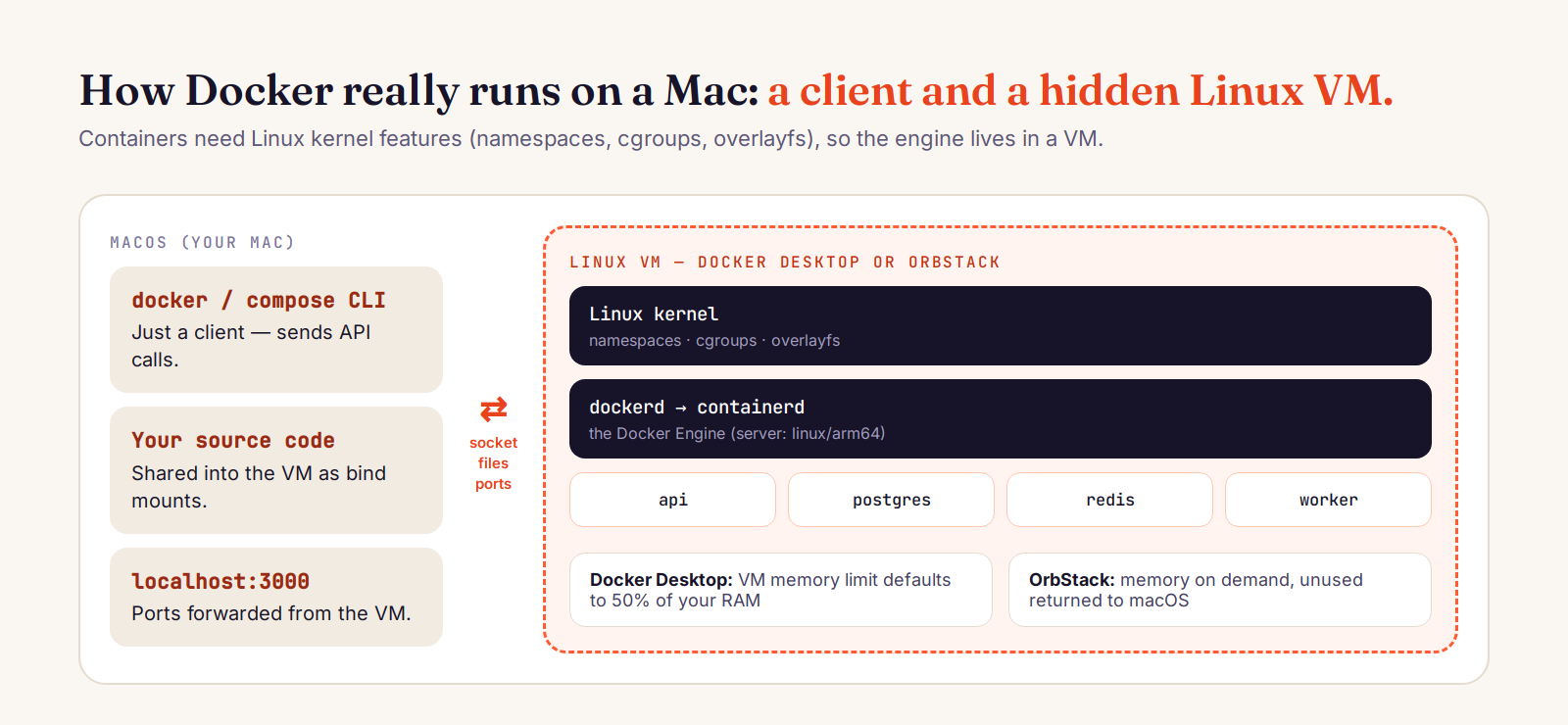
Run docker version and look closely at the two halves of the output. The client is a macOS program. The server — the Docker Engine that actually runs containers — is Linux:
$ docker version --format 'Client: {{.Client.Os}}/{{.Client.Arch}}  Server: {{.Server.Os}}/{{.Server.Arch}}'
Client: darwin/arm64  Server: linux/arm64

$ docker run --rm alpine uname -sr
Linux 6.x.x          # a Linux kernel, on your Mac
The docker command on your Mac is just a client. It sends API requests over a socket (/var/run/docker.sock) to dockerd, which lives inside a Linux VM. Docker Desktop's own settings call it what it is: "the Docker Desktop Linux VM" (Docker docs).
Why a VM? Because containers are a Linux kernel feature
A container isn't a tiny VM — it's an ordinary Linux process wrapped in kernel features that isolate and limit it:
Namespaces give the process its own view of PIDs, network, mounts and hostnames.
cgroups cap how much CPU and memory it can use.
Union filesystems (like overlayfs) stack image layers into one root filesystem.
macOS's kernel (XNU) doesn't provide these Linux features, so Linux containers can't run on it directly. Every Docker setup on a Mac — Docker Desktop, OrbStack, Colima — solves this the same basic way: run a Linux kernel in a VM and put the Docker Engine inside it. The difference between them is how heavy that VM is and how well it cooperates with macOS.
Why Docker Desktop uses so much memory
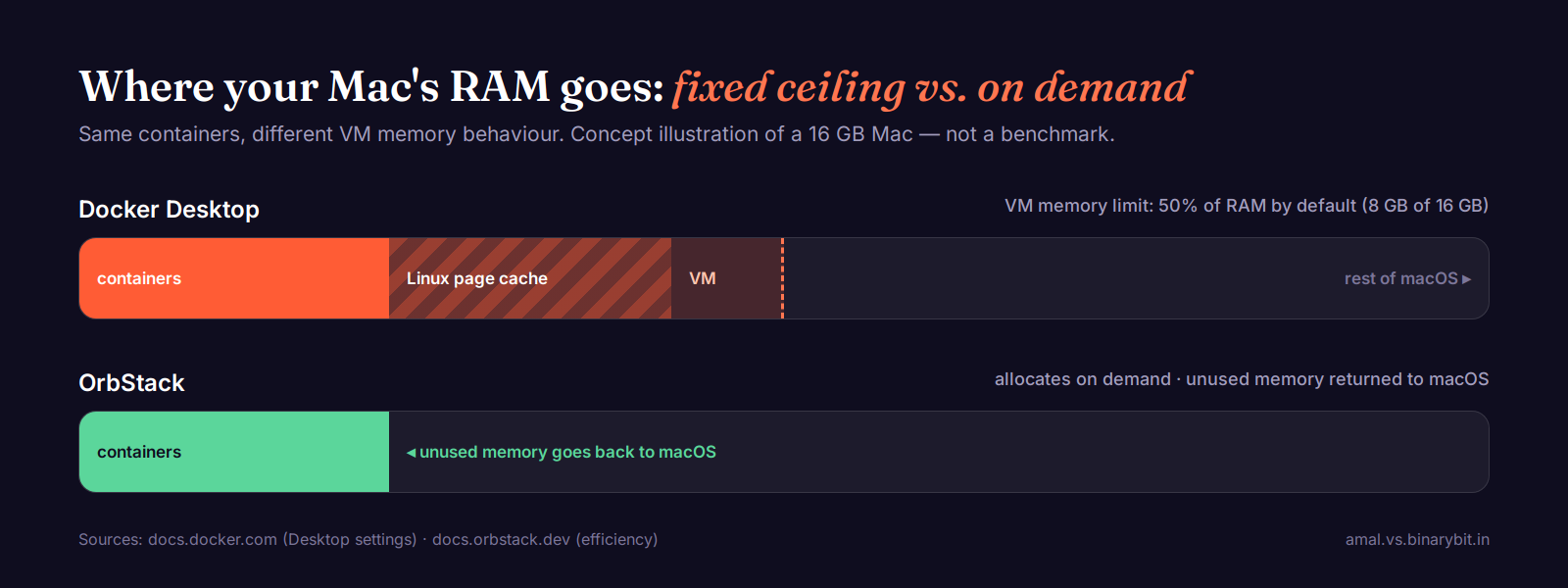
Open Docker Desktop → Settings → Resources. The memory limit is the "RAM allocated to the Docker VM", and it "defaults to 50% of your host's memory" (Docker docs). On a 16 GB MacBook, that's an 8 GB ceiling for the VM before you've started a single container.
Three things make that ceiling feel like a floor in practice:
Linux uses free RAM as cache. Inside the VM, the kernel keeps file data from image layers, builds and volumes in its page cache. That's good behaviour on a real Linux server — but from macOS's point of view, the VM's memory just keeps growing toward its limit.
Memory isn't reliably handed back. Once the VM has touched memory, macOS often can't reclaim it until the VM shrinks it or restarts. That's why Docker's VM can sit near the top of Activity Monitor even when your containers are idle.
The VM runs even when you aren't. Docker Desktop added Resource Saver mode to address this: it turns the Linux VM off when Docker is idle, and restarting it "may take 3–10 seconds" when you next run a container.
There's also a cost at the VM boundary: every bind mount (your source code) and every published port has to cross from macOS into the VM. Docker Desktop now defaults to VirtioFS for file sharing, which is much faster than older options, but the boundary is still there.
What OrbStack does differently
OrbStack is honest about the same constraint: it "uses a lightweight Linux virtual machine with a shared kernel" (OrbStack architecture). The difference is in how that VM is built and tuned for macOS:
Dynamic memory. "OrbStack allocates memory on-demand, so usage starts low and grows as needed" — and "unused memory is automatically returned to macOS" (OrbStack efficiency).
Near-zero idle CPU. OrbStack reports "around 0.1% CPU when idle, often dropping to 0%", which matters for battery life.
Fast file sharing. It builds on VirtioFS "with custom dynamic caching and optimizations" for bind mounts.
Rosetta for x86 images on Apple Silicon, which OrbStack notes is "much faster than the commonly-used QEMU".
Networking that follows your Mac. DNS is forwarded to macOS so VPN settings keep working, and every container gets a domain like
my-api.orb.local— Compose services getservice.project.orb.local— with zero-setup HTTPS.More than Docker. The same VM also runs a Kubernetes cluster and full Linux machines when you need them.
OrbStack doesn't remove the VM — it makes the VM behave like a good macOS citizen: small when idle, elastic under load.
Side by side
Where containers run: both — a Linux VM on your Mac.
Memory: Docker Desktop — fixed ceiling, default 50% of RAM. OrbStack — on demand, unused memory returned to macOS.
Idle: Docker Desktop — optional Resource Saver stops the VM (3–10 s to wake). OrbStack — ~0.1% CPU idle.
x86 images on Apple Silicon: both can use Rosetta; OrbStack enables it out of the box.
Extras: Docker Desktop — Extensions, Docker Scout, enterprise admin controls. OrbStack — container domains, Linux machines, built-in Kubernetes.
License: Docker Desktop — paid for companies with more than 250 employees or more than $10M revenue. OrbStack — free for personal use, paid for commercial use (30-day trial).
How to switch from Docker Desktop to OrbStack (safely)
The migration keeps a copy of your Docker Desktop data, and you can switch back with one command.
1. Install OrbStack
brew install orbstack # or download the app from orbstack.dev2. Quit Docker Desktop and migrate your data
OrbStack offers to migrate on first launch. You can also run it yourself — it copies your containers, volumes and images:
orb docker migrate3. Point the docker CLI at OrbStack
docker context use orbstack
docker context ls          # the * marks the active engine
4. Verify everything works
docker ps
docker compose up -d
docker version --format 'Server: {{.Server.Os}}/{{.Server.Arch}}'
Then open Activity Monitor and compare. Run your normal stack for a day, watch memory and battery, and only then uninstall Docker Desktop. If you have older Docker CLI tools in /usr/local/bin from Docker Desktop, remove them so OrbStack's versions are used.
Rollback in one line
# stop OrbStack, start Docker Desktop, then:
docker context use desktop-linux
When you should stay on Docker Desktop
Your company standardises on Docker Business features: SSO, centrally managed settings, image access controls.
You rely on Docker Desktop Extensions or integrated tooling like Docker Scout inside the app.
You need the same tool on Windows, Linux and Mac across a team — OrbStack is macOS-only.
You'd rather use a free, open-source option for personal work: Colima is another lightweight Lima-based VM worth a look.
FAQ
Does Docker run natively on macOS?
No. Linux containers need Linux kernel features (namespaces, cgroups, union filesystems), so on macOS the Docker Engine always runs inside a Linux VM. The docker command you type is a client talking to that VM.
Why does Docker Desktop use so much memory on Mac?
Its Linux VM gets a memory limit that defaults to 50% of your RAM, Linux fills spare memory with page cache, and that memory isn't reliably returned to macOS while the VM runs. Lower the limit in Settings → Resources, or enable Resource Saver to stop the VM when idle.
Is OrbStack a drop-in replacement for Docker Desktop?
For most workflows, yes: the same docker and docker compose commands work, and orb docker migrate moves your containers, volumes and images. You can run both side by side and switch with docker context use.
Is OrbStack free?
It's free for personal, non-commercial use. Freelancers and companies need a paid license; new installs get a 30-day trial.
Prefer the 60-second version? Watch the reel: Docker on your Mac is secretly a Linux VM. Sources: Docker Desktop settings, Docker Desktop for Mac, OrbStack architecture and OrbStack efficiency.