Wireless GPU Explained: WiCi One, Wi-Fi 7 and Local AI
What a wireless GPU is, how WiCi One shares an RTX GPU over Wi-Fi 7, and how SSD streaming runs a 763B AI model on 32 GB of VRAM.
By Amal V S, Backend & AI Systems Architect · Sat Oct 31 2026
What is a wireless GPU? A wireless GPU is an external graphics card in its own box that your laptop, desktop or tablet uses over Wi-Fi instead of a cable. A virtual driver makes the remote GPU appear as if it were installed locally, so apps, games and AI tools can use it, and several devices in the same home can share it.
Local AI has two big problems. The models worth running are far too large for consumer graphics cards, and a GPU is stuck inside one computer that nobody else in the house can use. The first commercial wireless GPU, WiCi One, goes after both: it shares an RTX GPU over Wi-Fi 7, and pairs it with an open-source engine that runs models bigger than the GPU's memory by streaming them from an SSD.
Here is how it works, why Wi-Fi should be too slow for a GPU, the math behind running a 763-billion-parameter model on 32 GB of VRAM, and who should actually buy one.
Key facts at a glance
| Question | Answer |
|---|---|
| What is it? | An external GPU box connected over Wi-Fi 7 instead of Thunderbolt or PCIe |
| First product | WiCi One by WiCi (a member of the NVIDIA Inception program) |
| GPU options | NVIDIA RTX 5060 Ti (16 GB GDDR7) or RTX 5090 (32 GB GDDR7) |
| Wireless link | Wi-Fi 7, 4×4 MIMO, 320 MHz channel, about 11.5 Gbps theoretical |
| How devices use it | Virtual GPU driver (macOS, Windows, Linux), an SDK, or an OpenAI-compatible API |
| Big-model trick | InferSSD, an open-source (Apache-2.0) engine that streams mixture-of-experts weights from NVMe SSD |
| Headline demo | DeepSeek V4.1 Flash (763B total parameters) running on a 32 GB RTX 5090 at about 7 tokens per second |
| Price and shipping | Reported early-access price from $1,999 for the RTX 5060 Ti edition; RTX 5090 edition reported to ship December 2026 |
What is WiCi One?
WiCi One is a compact box that holds an NVIDIA RTX graphics card, a small Intel CPU, memory and a large NVMe SSD, with a Wi-Fi 7 radio. It is essentially a small PC whose only job is to lend its GPU to other devices.
| RTX 5060 Ti edition | RTX 5090 edition | |
|---|---|---|
| GPU memory | 16 GB GDDR7 | 32 GB GDDR7 |
| CPU | Intel Core 3 100U | Intel Core Ultra 7 255H |
| Storage | 1 TB NVMe | 4 TB NVMe |
| Wireless | Wi-Fi 7, 4×4 MIMO, 320 MHz | Wi-Fi 7, 4×4 MIMO, 320 MHz |
Specs as reported by Notebookcheck and Let’s Data Science. Prices and editions were still changing at the time of writing, so check WiCi's site before you buy.
There are three ways to use it:
Driver mode: a virtual GPU driver makes WiCi One show up as a local graphics card on macOS, Windows or Linux, so Blender, Premiere Pro or a game can use it.
SDK: Python libraries let AI code target the box like any other GPU.
API mode: an OpenAI-compatible HTTP API, so any app that talks to an OpenAI-style endpoint can use a model running on the box.
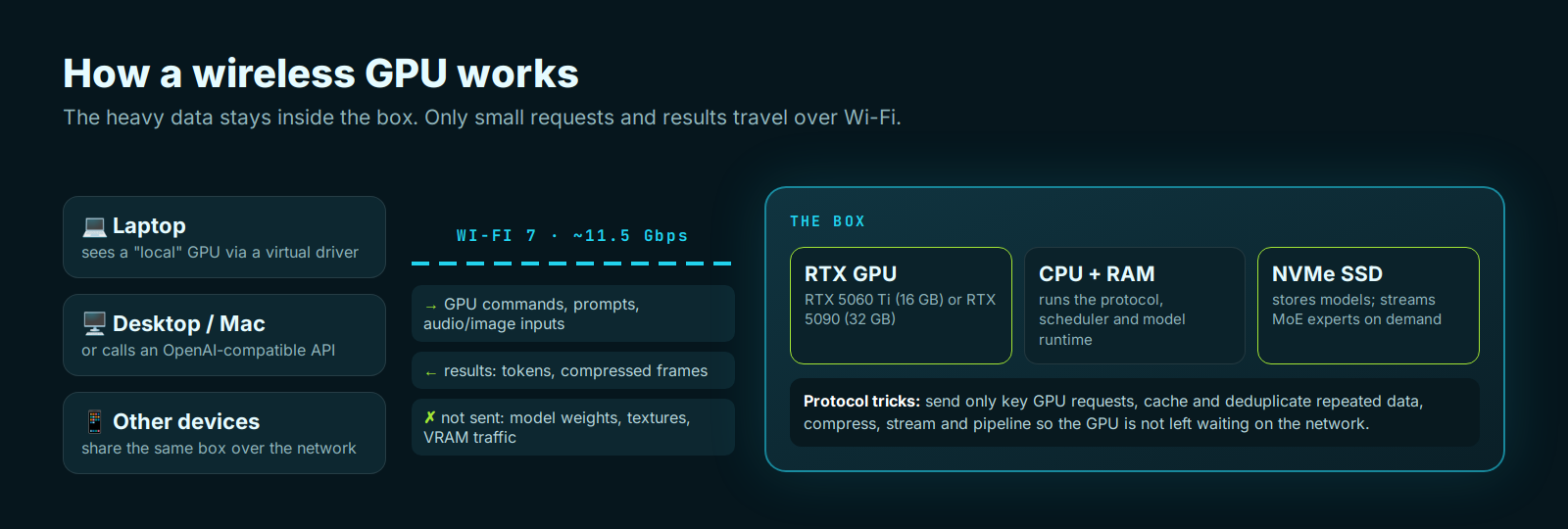
Why Wi-Fi should be far too slow for a GPU
A graphics card normally sits in a PCIe slot with an enormous amount of bandwidth. External GPUs over Thunderbolt already lose performance because their link is narrower. Wi-Fi is narrower still:
| Connection | Theoretical bandwidth |
|---|---|
| PCIe 5.0 ×16 (desktop slot) | ≈ 504 Gbps per direction |
| Thunderbolt 5 | 80 Gbps (up to 120 Gbps one way) |
| OCuLink (PCIe 4.0 ×4) | ≈ 64 Gbps |
| Thunderbolt 4 | 40 Gbps (32 Gbps for PCIe data) |
| Wi-Fi 7 link in WiCi One | ≈ 11.5 Gbps |
That is roughly 40 times less than a desktop PCIe 5.0 slot, before you count the extra latency of a radio link. If a game or app pushed its normal GPU traffic over that link, the GPU would spend most of its time waiting.
How the wireless protocol makes it work
The answer is to stop sending most of that traffic. Normally, an app and its GPU talk constantly: commands, textures, buffers, synchronization. WiCi's protocol sends only the key GPU requests across Wi-Fi and keeps the heavy data inside the box. According to the company, it combines:
Caching: data the GPU already has, like textures or model weights, is never sent twice.
Deduplication: repeated commands and data are recognized and skipped.
Compression: what does cross the link is compressed, including rendered frames coming back.
Streaming and pipelining: new work is sent while the GPU is still busy, so it does not sit idle waiting for the network.
This is also why AI is the ideal workload for a wireless GPU. A language model's weights stay in the box's VRAM and SSD. The only things crossing Wi-Fi are your prompt (a few kilobytes) and the generated text. Gaming is much harder, because finished frames must come back to your screen many times per second. WiCi claims 80 FPS in Cyberpunk 2077 at 4K Ultra with DLSS 4 on the RTX 5060 Ti edition, but independent latency tests were not yet published.
Local AI's two big problems
Problem 1: the best models don't fit in a consumer GPU
To run a model quickly, its weights need to sit in the GPU's memory (VRAM). A model's size is roughly its number of parameters × bytes per parameter. At 4-bit precision, every billion parameters needs about 0.5 GB.
| Model | Total parameters | Approx. size at 4-bit | Fits in a 32 GB RTX 5090? |
|---|---|---|---|
| 8B dense model | 8B | ≈ 4–5 GB | Yes |
| 70B dense model | 70B | ≈ 35–40 GB | No |
| DeepSeek V4.1 Flash (MoE) | 763B (8–16B active) | ≈ 420+ GB | No, about 13× too big |
| Muse-Spark-Open (MoE) | 816B (42B active) | ≈ 450+ GB | No |
Frontier-class open models are measured in hundreds of billions of parameters. Even the biggest consumer card, the RTX 5090 with 32 GB, holds only a small fraction of them. Normally that means renting cloud GPUs or buying a server with hundreds of gigabytes of memory.
Problem 2: a GPU doesn't like to share
A GPU lives inside one computer. If your family, your team or your own laptop and desktop all want local AI, each needs its own expensive card. And sharing one GPU between several apps is awkward: each model takes a big chunk of VRAM, loading and unloading models takes time, and two jobs fighting over memory can crash each other. WiCi One is designed as a shared household GPU, with the box itself deciding which device's work runs and which models stay loaded.
How a 763B model runs on 32 GB of VRAM: mixture of experts
The trick depends on how modern large models are built. Most of them are mixture-of-experts (MoE) models. Instead of one giant network where every weight is used for every word, an MoE model has many smaller "expert" networks and a router that picks a few experts for each token.
Think of a hospital with hundreds of specialists. Each patient sees only the two or three doctors they need, not the whole staff. The hospital is huge, but each visit is small.
DeepSeek V4.1 Flash has about 763 billion parameters in total, but only about 8 to 16 billion are active for any one token. At 4-bit precision that is roughly 4 to 8 GB of weights per token, which fits easily in a 32 GB GPU. The catch is that the router picks a different set of experts for every token, so all 763B parameters still need to be reachable quickly.
InferSSD: running models bigger than your VRAM from an SSD
InferSSD is WiCi's open-source inference engine (Apache-2.0), built on llama.cpp and using standard GGUF model files. It keeps the whole model on a fast NVMe SSD and moves only what each token needs into memory:
The router picks experts. For each token, the model decides which experts it needs.
Experts are read from SSD. InferSSD knows the exact byte range of every expert in the model file and reads just those ranges, using fast asynchronous I/O (io_uring on Linux).
Hot experts are cached. Recently used experts stay in RAM, and on NVIDIA GPUs in a VRAM cache tier, so popular experts are not re-read.
Dense layers stay on the GPU. The parts of the model used by every token run on the GPU at full speed.
Memory limits are managed automatically: InferSSD uses whatever RAM and VRAM is free. See the architecture notes for details.
Measured by the developers on DeepSeek V4.1 Flash (4K-token prompt, 256 output tokens), in tokens per second:
| Hardware | llama.cpp writing speed | InferSSD writing speed | InferSSD reading speed |
|---|---|---|---|
| RTX 5060 Ti (16 GB) | 0.24 tok/s | 2.55 tok/s (10.5×) | 75 tok/s |
| RTX 5090 (32 GB) | 0.87 tok/s | 7.27 tok/s (8.4×) | 165 tok/s |
| MacBook Pro M5 Max (48 GB) | 0.87 tok/s | 2.87 tok/s (3.3×) | 29 tok/s |
| NVIDIA DGX Spark (128 GB) | 1.61 tok/s | 7.26 tok/s (4.5×) | 128 tok/s |
Be realistic about what that means. About 7 tokens per second on the RTX 5090 is roughly reading speed for a slow reader: fine for background jobs, agents, document processing and private analysis, but slower than a cloud chatbot. On the 16 GB card, 2.5 tokens per second is best for tasks where you can wait. The point is that a model of this size runs at all on a single consumer GPU, privately, at home.
Try InferSSD on your own GPU
InferSSD runs on Linux with an NVIDIA GPU or on Apple Silicon Macs (Windows support is in progress). You need about 470 GiB of free disk space for DeepSeek V4.1 Flash.
# install (builds from source, no sudo)
curl -fsSL https://github.com/wici-ai/inferssd/releases/latest/download/install.sh | sh

# chat in the terminal
inferssd cli -hf mrfakename/DeepSeek-V4.1-Flash-1017-GGUF

# or start a web UI + OpenAI-compatible API on http://127.0.0.1:8080/v1
inferssd serve -hf mrfakename/DeepSeek-V4.1-Flash-1017-GGUF
You do not need WiCi One for this part. Any machine with a fast NVMe SSD and a supported GPU can use it, which makes it useful on its own.
Wireless GPU vs the alternatives for local AI
| Option | Best for | Trade-off |
|---|---|---|
| Wireless GPU (WiCi One) | Sharing one GPU across several devices with no cables | New product, vendor claims, Wi-Fi limits gaming latency |
| Thunderbolt / OCuLink eGPU | One laptop that needs a GPU at a desk | Cable-bound, one device at a time |
| Home server + Ollama / llama.cpp over LAN | DIY users who want shared local AI cheaply | You build and maintain it; no "local GPU" driver for apps |
| Mac with lots of unified memory | Running big models quietly on one machine | Expensive memory upgrades, one user |
| NVIDIA DGX Spark (128 GB) | Developers needing big memory in a small box | Costly; still a single machine |
| Cloud GPUs / APIs | Maximum speed and the largest models | Ongoing cost, data leaves your network |
The honest comparison: if you only want shared local AI, a home server with a GPU running an OpenAI-compatible server already gets you most of the way, because AI traffic over a network is light. What a wireless GPU adds is the virtual local GPU for regular apps and games, a box that is set up for sharing out of the box, and a tuned SSD-streaming stack for oversized models.
Should you buy a wireless GPU?
Yes, if several people or devices in your home or small office want private local AI, and you would rather buy one shared GPU than several.
Yes, if you want to run very large MoE models privately and can live with a few tokens per second.
Wait, if gaming is your main use. Wired eGPUs still have far more bandwidth and lower latency, and independent tests are not out yet.
Skip it, if you have one desktop with a good GPU already: install InferSSD or llama.cpp and expose an API on your network instead.
The bigger idea will outlast this first product: GPUs are becoming a shared home appliance, like a Wi-Fi router or a NAS, and smart software like SSD expert streaming is shrinking the gap between "model I can run at home" and "frontier model".
FAQ
Is a wireless GPU real?
Yes. WiCi One is a wireless external GPU box with an NVIDIA RTX 5060 Ti or RTX 5090 that connects over Wi-Fi 7 and appears to your computer as a local GPU through a virtual driver.
How fast is a wireless GPU connection?
WiCi One's Wi-Fi 7 link is about 11.5 Gbps in theory, compared with 40 Gbps for Thunderbolt 4, 80 Gbps for Thunderbolt 5 and around 504 Gbps for a PCIe 5.0 ×16 slot. Its protocol avoids sending most GPU traffic over the link.
Can I game on a wireless GPU?
WiCi claims around 80 FPS in Cyberpunk 2077 at 4K Ultra with DLSS 4 on the RTX 5060 Ti edition. Independent latency and frame-time tests had not been published at the time of writing.
How can a 763B model run on a 32 GB GPU?
It is a mixture-of-experts model that uses only about 8–16B parameters per token. InferSSD keeps the full model on an NVMe SSD, streams the experts each token needs into RAM and VRAM, and caches popular ones. On an RTX 5090 it writes about 7 tokens per second.
Is InferSSD free?
Yes. InferSSD is open source under the Apache-2.0 license and runs on Linux with NVIDIA GPUs and on Apple Silicon Macs, with Windows support in progress. Model weights keep their own licenses.
How much does WiCi One cost?
Reports put early-access pricing at $1,999 for the RTX 5060 Ti edition, with higher list prices after early access. Pricing for the RTX 5090 edition differs between reports, so check WiCi's official site.
Sources: wici-ai/inferssd on GitHub (benchmarks and architecture) · Notebookcheck · Tom’s Hardware · Let’s Data Science. Performance figures are manufacturer or developer claims unless stated otherwise. Last updated October 31, 2026.