DeepSeek Super-Agent Explained: How It Works & Setup Guide
DeepSeek's open-source Super-Agent joins your team on GitHub and chat and replies with pull requests. How it works, setup, safety and vs Claude Code.
By Amal V S, Backend & AI Systems Architect · Mon Nov 02 2026
What is DeepSeek Super-Agent? DeepSeek Super-Agent (
dsh-superagent) is an open-source, MIT-licensed coding agent that DeepSeek released on October 31, 2026. Instead of waiting in your terminal, it joins your team: it watches one GitHub repository (and optionally Feishu chats), picks up requests from approved people, works on each one in its own session and git worktree, and replies in the same thread, usually with a pull request.
Most AI coding tools are something you drive: you open Claude Code, Codex or Copilot and type. Super-Agent is built to be something you work with, like a teammate who is in every issue and chat thread. It hit roughly 9,000 GitHub stars in its first two days.
It also arrives at the right moment. GitHub's Octoverse 2026 data shows AI agents now write the first draft of more than 40% of pull requests, up from 17% in March. The next question is not whether agents write code, but how a team lets an agent act on its behalf without drowning in noise. That is exactly the problem Super-Agent is designed around.
DeepSeek Super-Agent: key facts
| Official name | dsh-superagent (deepseek-ai/dsh-superagent-prototype) |
| Released | October 31, 2026 |
| License | MIT |
| Status | Research prototype, "not an official DeepSeek product" |
| Runs on | DeepSeek Harness (DSH), as a plugin bundle; written in TypeScript |
| Listens to | One GitHub repository; optionally Feishu (Lark) chats |
| Answers with | Comments, review replies and pull requests in the original thread |
| Model | Any model provider configured in DeepSeek Harness |
| Core principle | "Take as little human attention as possible, and give as much value as possible." |
How DeepSeek Super-Agent works
The design is small and strict. A message moves through five steps, and each step has a rule about who may ask for work and how far that work may go.
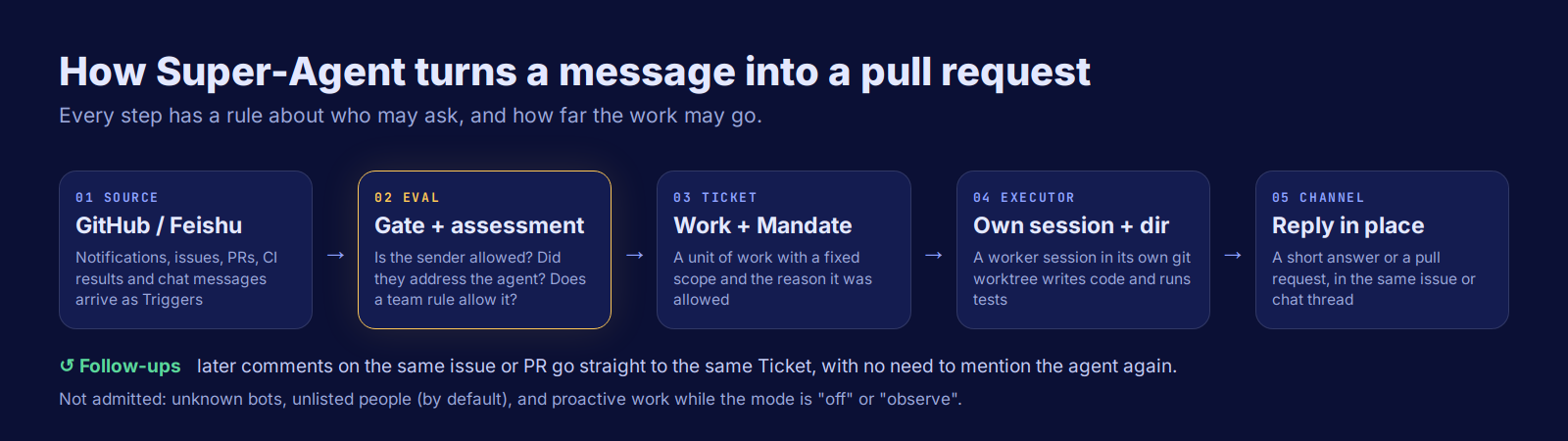
| Step | What it is | In plain words |
|---|---|---|
| Source | A stream of events: GitHub notifications, issues, PRs, CI results, Feishu messages | Where requests come from |
| Eval | A deterministic gate (who sent it, did they address the agent) plus a model assessment against team rules | Should the agent do anything? |
| Ticket + Mandate | A unit of authorized work, with an immutable record of why it was allowed and its scope | The job, and its permission slip |
| Executor | A worker session named worker-<ticket> with its own directory, usually a git worktree | The agent doing the work |
| Channel | The reply path: a GitHub comment, review reply or Feishu thread reply | Answering where you asked |
One detail makes it feel like a teammate: follow-ups. Once a Ticket exists, later comments on the same issue or pull request go straight to it, so you can say "also handle the CSV export" without mentioning the agent again. CI results and bot comments on that PR reach the Ticket too, as context.
Try it: will the agent act on this message?
This is the part most people get wrong when they imagine an "autonomous" agent. Pick a sender and situation to see what Super-Agent does by default:
| Who writes | Mentions the agent? | Default result |
|---|---|---|
| Teammate on the allowed list | Yes | Explicit request: a Ticket opens in every mode |
| Teammate on the allowed list | No | Inferred candidate: ignored (off), recorded only (observe), accepted if a rule matches (auto) |
| Person not on the list | Yes or no | Ignored by default; the team can open a scope, such as a support chat |
| Bot on the bot list (e.g. Dependabot) | Yes | Inferred candidate only; bots can never make explicit requests |
| Any other bot | Any | Not admitted |
| Anyone, on an issue/PR with a live Ticket | Not needed | Goes to that Ticket (people) or as context only (bots and CI) |
The three accept modes
"Proactive" work, where the agent acts without being asked, is controlled by an accept mode and by rules your team writes in plain language:
off: the agent only does what people explicitly ask for.
observe (default): the agent checks messages against your rules and records "would accept", but does nothing. You review those decisions first.
auto: a message that matches at least one rule becomes a Ticket automatically. Switch to this only after observe mode has looked right for a while.
The big idea: an agent that saves attention, not just time
An agent that can act for a whole team can also waste a whole team's attention. Super-Agent's documentation is built on one principle: take as little human attention as possible, and give as much value as possible. In practice that means:
It acts only when asked, or when a rule the team wrote allows it.
It confirms a request once, stays quiet while it works, and writes again only when a result is ready, it needs a decision, or it is stuck.
It asks one concrete question at a time, in a structured form, instead of burying questions in long reports.
It stops by impact: a local change goes as far as a reviewable PR, while a change that needs a design decision stops with a clear question.
Its web panel lists only what needs a person: tickets awaiting an answer, a review, or blocked. A healthy state takes no space.
This matters because the hidden cost of AI coding is not tokens. It is review time, noise and code nobody owns. I wrote about that in AI Technical Debt Explained, and Super-Agent's design reads like a direct answer to it.
DeepSeek Super-Agent vs Claude Code and other coding agents
Reports describe Super-Agent as DeepSeek's answer to Claude Code, but they solve different problems. There are no published head-to-head benchmarks yet.
| Super-Agent | Interactive agents (Claude Code, Codex CLI, Copilot in the IDE) | |
|---|---|---|
| How you start work | Mention it in an issue, PR or chat | Open a session and type a prompt |
| Who it works for | A team, with an allowed list | The person at the keyboard |
| Where it answers | In the original thread, usually as a PR | In your terminal or editor |
| Proactive work | Yes, only through written rules and accept modes | Generally no |
| Parallel work | One session and worktree per Ticket, with a concurrency limit | Usually one session per developer |
| Maturity | Research prototype | Production products |
So the useful comparison is not "which writes better code". The model writes the code, and Super-Agent can use whatever model you configure. The question is whether your team wants an agent embedded in its workflow, and is ready to own what it posts.
How to set up DeepSeek Super-Agent
Setup has many steps, so the project does something clever: a coding agent sets it up with you. Here is the path.
1. Prerequisites
Node.js 22.19+ or 24+, pnpm, git 2.32+, tmux and Python 3.8+
GitHub CLI (
gh) 2.48 or later, and a repository on github.com (GitHub Enterprise Server is not supported)DeepSeek Harness installed, with a model provider configured
A dedicated GitHub user account for the agent, with write access to the repo (a GitHub App cannot be the agent)
2. Give the agent its own GitHub CLI
The agent must act as its own account, never yours. A small wrapper keeps its credentials separate:
mkdir -p ~/.local/bin
cat > ~/.local/bin/gh-agent <<'EOF'
#!/bin/sh
GH_CONFIG_DIR="$HOME/.config/gh-agent" exec gh "$@"
EOF
chmod +x ~/.local/bin/gh-agent
gh-agent auth login          # sign in as the AGENT account
gh-agent api user --jq .login  # should print the agent's login
3. Clone the repo and let your agent run the setup
git clone https://github.com/deepseek-ai/dsh-superagent-prototype.git
cd dsh-superagent-prototype
Then ask your coding agent:
Read SETUP.md in this repository and set up dsh-superagent with me.
It asks one short question at a time (repository, agent account, who may make requests, whether to allow auto-merge), shows one plan, and only then installs and configures everything. It never asks for secrets in the chat.
4. Recommended first settings
Allowed list: just you, at first.
Accept mode: observe.
Auto-merge: off. People merge until the agent's PRs have been right for a while.
Commit author: the agent account, so its work is visibly its own.
5. Try it
From an allowed account, comment on an issue: @<agent-login> fix the crash when the report list is empty. A Ticket appears in the panel (on port 3082 by default) within about a minute, and a pull request follows.
Security and limitations: read this before you run it
It runs with full access. Worker sessions run commands without approval as your OS user. The docs are clear: account wrappers choose credentials but do not isolate the process. For real use, run it under a dedicated OS account that holds only the agent's credentials.
It is a research prototype. DeepSeek says it may contain bugs, the public code differs from its internal version, and you should review and adapt it before use.
One repository, github.com only, and Feishu as the only chat source today (Slack or Teams would need a new Source).
It reads untrusted text. Issues and comments are inputs, not permissions: the host enforces allowed lists and Mandates, but you should still treat anything the agent reads as untrusted.
No independent benchmarks yet comparing it with other coding agents.
Some organizations restrict DeepSeek software; check your company's policy first. The code is open and can use any configured model provider.
Why it matters
The first wave of AI coding tools made one developer faster. The next wave is about agents as team members, and the hard problems there are permission, noise and accountability, not code generation. Super-Agent is one of the clearest open designs for those problems: allowed lists, written rules, an observe-first rollout, and a panel that only shows what needs a human.
Even if you never run it, its docs are worth reading as a blueprint for any team agent. If you are interested in agents improving their own setup, see also Google Harness² explained.
FAQ
Is DeepSeek Super-Agent free and open source?
Yes. dsh-superagent is MIT-licensed on GitHub at deepseek-ai/dsh-superagent-prototype. You pay only for the model you configure in DeepSeek Harness.
Is DeepSeek Super-Agent better than Claude Code?
They are different tools. Claude Code is an interactive agent you drive; Super-Agent is a team agent that listens on GitHub and chat and replies with pull requests. No head-to-head benchmarks have been published.
Does DeepSeek Super-Agent need DeepSeek models?
It runs as a plugin for DeepSeek Harness and uses the model provider configured there, so you are not limited to one model.
Can Super-Agent work without being asked?
Only if your team writes rules that allow it and switches the accept mode to auto. By default it runs in observe mode, which records what it would have done without acting.
Does it support Slack or GitLab?
Not out of the box. The prototype supports one github.com repository and Feishu chats. Its docs include a cookbook for adding new Sources.
Is it safe to run?
Treat it as research code. Workers run commands without approval as your OS user, so use a dedicated OS account and a dedicated GitHub account, start with a short allowed list and keep auto-merge off.
Sources: deepseek-ai/dsh-superagent-prototype (README, SETUP.md and docs 000–007) · The Next Web · Visual Studio Magazine on GitHub Octoverse 2026. Star count as of November 2, 2026.